Built for accounting firms

Manage client books and Puerto Rico reporting from one account.

Use one standard Accountberry account to manage multiple companies and work directly in each company's books. Join client-owned companies by invitation at no additional user cost, or create companies with their own subscription plans.

One account · Multiple companies · Plans are billed per company, not per additional user

See how client access works
  • One login
  • Roles and permissions
  • Shared live books
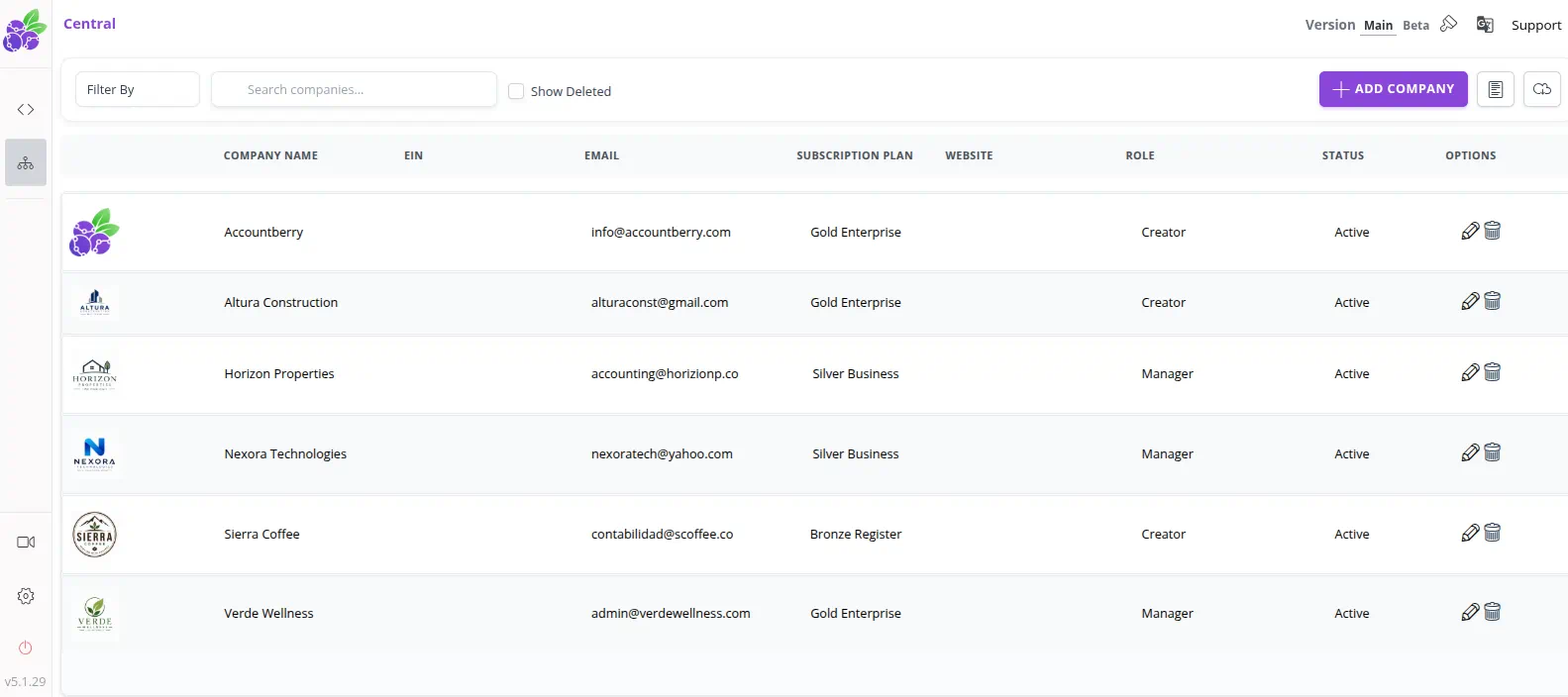
Central · Multi-company access
Accountberry Central table showing multiple companies, subscription plans, Creator and Manager roles, and active statuses
Companies you own and companies shared with you—all accessible from one account.
1,000+
businesses in the system
8+ years
supporting real accounting work
AWS cloud
cloud-based company data
Import + export
support for moving company data

One account, multiple companies

Two ways to manage client companies

Every user has the same Accountberry account type. The difference is who creates the company and takes responsibility for its subscription.

Client-created company

The client creates and pays

  1. 1The client creates the company and starts its 14-day trial.
  2. 2The client selects the appropriate plan and maintains the company's subscription.
  3. 3The client invites you and assigns your role and permissions.
  4. 4You work directly in the client's company from your existing Accountberry account.

Your invited access adds no additional user fee.

Accountant-created company

You create and pay

  1. 1You create a client company—or your firm's own company—from the same Accountberry account.
  2. 2That company starts its own 14-day trial and requires its own monthly plan afterward.
  3. 3While you own it, you are responsible for its subscription and manage it alongside your other companies.
  4. 4When the client is ready, transfer company ownership to the client's Accountberry account.

Each company has its own subscription, and ownership can move to the client later.

Roles and permissions control access inside invited companies. Available workflows depend on each company's selected plan.

Compare company plans

Shared financial workspace

Work directly in each client's accounting system

Review source activity, make accounting entries, and produce reports without waiting for a separate file or spreadsheet export.

Client access and control

Move between companies you created and companies you were invited to from one login.

  • One account for created and invited companies
  • User roles and permissions by area
  • Shared, current company data

Financial reporting and review

Follow activity from the ledger through the financial statements and operational reports.

  • General Ledger and Trial Balance
  • Profit & Loss, Balance Sheet, and Cash Flow
  • A/R and A/P aging plus customer statements

Books and close

Handle daily accounting and closing work in the same company file.

  • Chart of accounts and journal entries
  • Recurring transactions and reconciliations
  • Year-end closing workflows

Puerto Rico payroll and reporting

Keep payroll details and Puerto Rico reporting workflows connected to the client's accounting records.

  • Payroll, paystubs, and leave balances
  • Quarterly and annual employer reporting
  • Puerto Rico withholding statement workflows
Puerto Rico workflows

Payroll records and forms in the same system

Prepare employee payroll records and the information needed for recurring Puerto Rico employer reporting without disconnecting payroll from the general ledger.

  • W-2PR
  • Form 499R-1B
  • Form 941-SP
  • Unemployment and disability
  • Choferil reporting
  • 480.6A and 480.6SP

Accountberry can generate supported electronic filing files. Payroll and Puerto Rico form workflows require the client's Gold Enterprise plan.

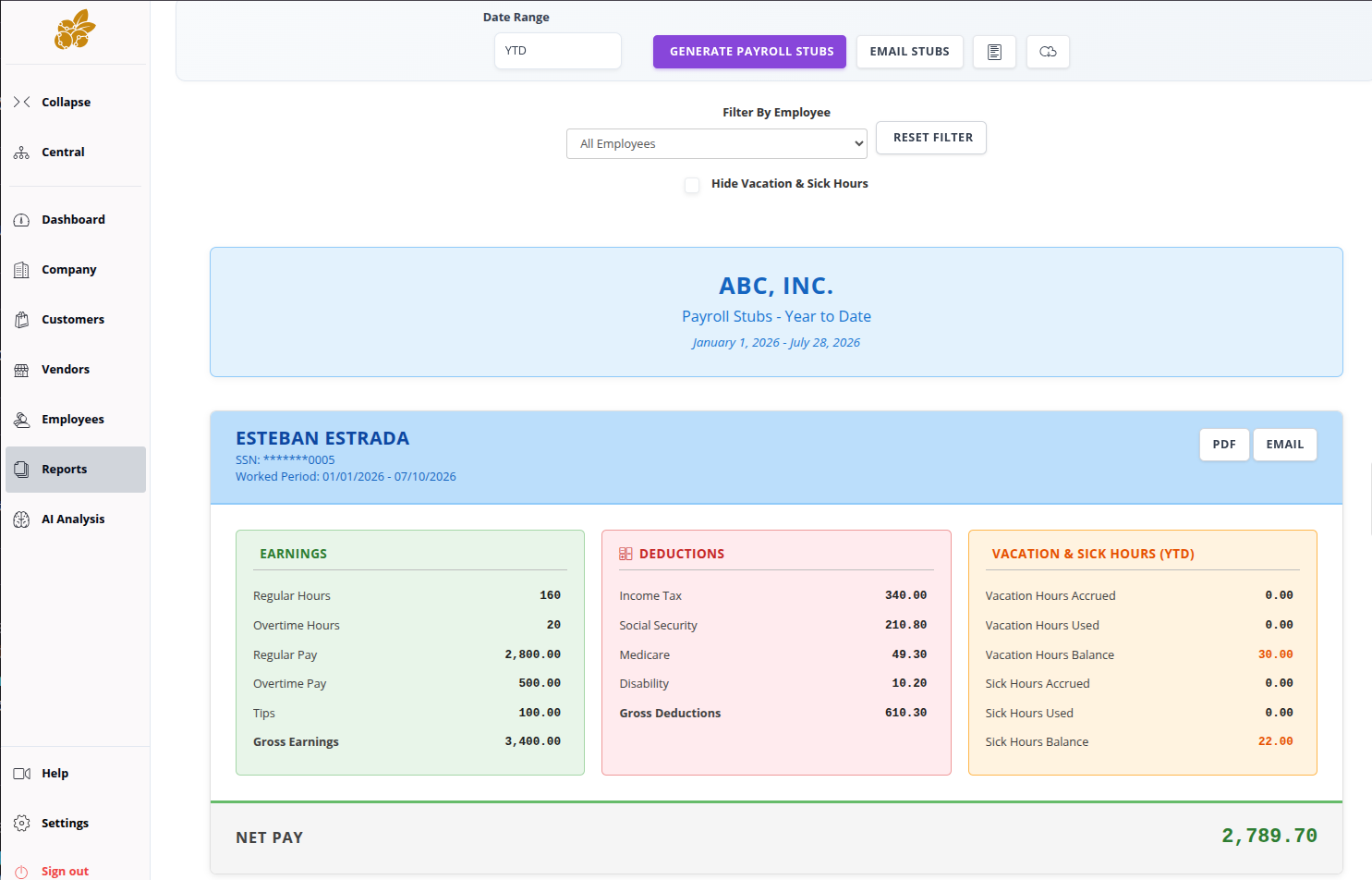
Payroll stubs report · Employee detail and year-to-date balances
Accountberry payroll stubs report showing earnings, deductions, vacation and sick hours, and net pay
Gold plan

Add automation when a client's books need it

Gold clients can bring bank activity into review workflows and use AI-assisted tools while the accountant keeps final judgment.

  • Plaid Bank Sync with no additional bank-sync fee
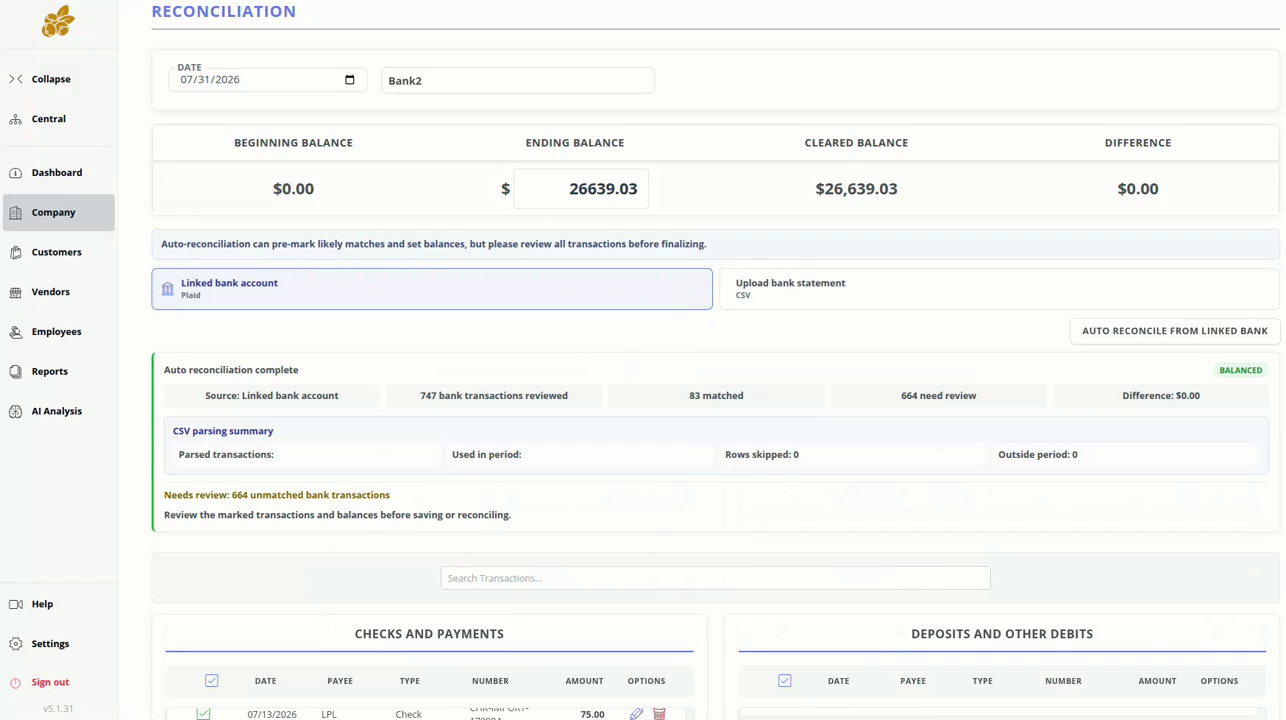
  • Auto-reconciliation from a linked bank or uploaded statement
  • AI-assisted transaction categorization
  • AI-assisted financial report analysis

Suggestions and pre-matches should be reviewed before entries or reconciliations are finalized.

Auto-reconciliation pre-marks likely matches and balances; you review the transactions before finalizing.

From accounting professionals

Built around the work accountants do every day

“Accountberry is easy to use and adapted to Puerto Rico payroll needs. Downloading reports for quarterly filings and annual reports saves significant time for other processes and projects.”

Dagmarit Meléndez Rivera

Accountant & Tax Consultant · Accounting Experts

Translated from Spanish · Edited for length

“Me encanta el programa y el apoyo técnico es excelente.”

Gisela Cruz Vázquez

Gisela Accounting

“The report section is an excellent tool for analysis and useful in decision-making. Highly recommended.”

Samuel E. Ortiz

Taxpoint

Edited for grammar and length

Frequently asked questions

How multi-company access works

When does an accountant pay for a subscription?

There is no additional user fee when a client owns a subscribed company and invites the accountant. If the accountant creates a client company, the accountant pays that company's subscription while they own it. The accounting firm's own company also requires its own paid plan.

Is there a separate account type for accountants?

No. Every user has the same Accountberry account type. From one account, an accountant can manage multiple companies they created or were invited to, subject to each company's role and permissions.

Can I transfer a company I created to the client?

Yes. Accountberry supports transferring company ownership to another Accountberry user. You can create and configure a client's company first, then transfer ownership to the client's account when they are ready to take it over.

Which features will I be able to use?

Your access depends on the permissions granted by the client and the company's selected plan. Gold-only features include payroll and Puerto Rico forms, Plaid Bank Sync, auto-reconciliation, AI transaction categorization, and AI financial report analysis.

Which Puerto Rico forms does Accountberry support?

Supported Gold workflows include W-2PR, 499R-1B, 941-SP, unemployment and disability reporting, Choferil, and 480.6A / 480.6SP, including supported electronic filing files.

Can client data be imported and exported?

Yes. Accountberry supports batch importing and data exports so company information can be brought in, reviewed, or used in other workflows.

Does AI replace accountant review?

No. Gold's AI-assisted analysis, categorization, and reconciliation features are designed to accelerate review. The accountant or business team remains responsible for checking and finalizing the work.

No added user fee for invited access

Ready to work from the same books as your clients?

Use one Accountberry account to manage your companies, then ask clients to invite you and assign the access each engagement requires.

Create your Accountberry account